Wiki Spectrum analyzer
Detection marks and the spur passport
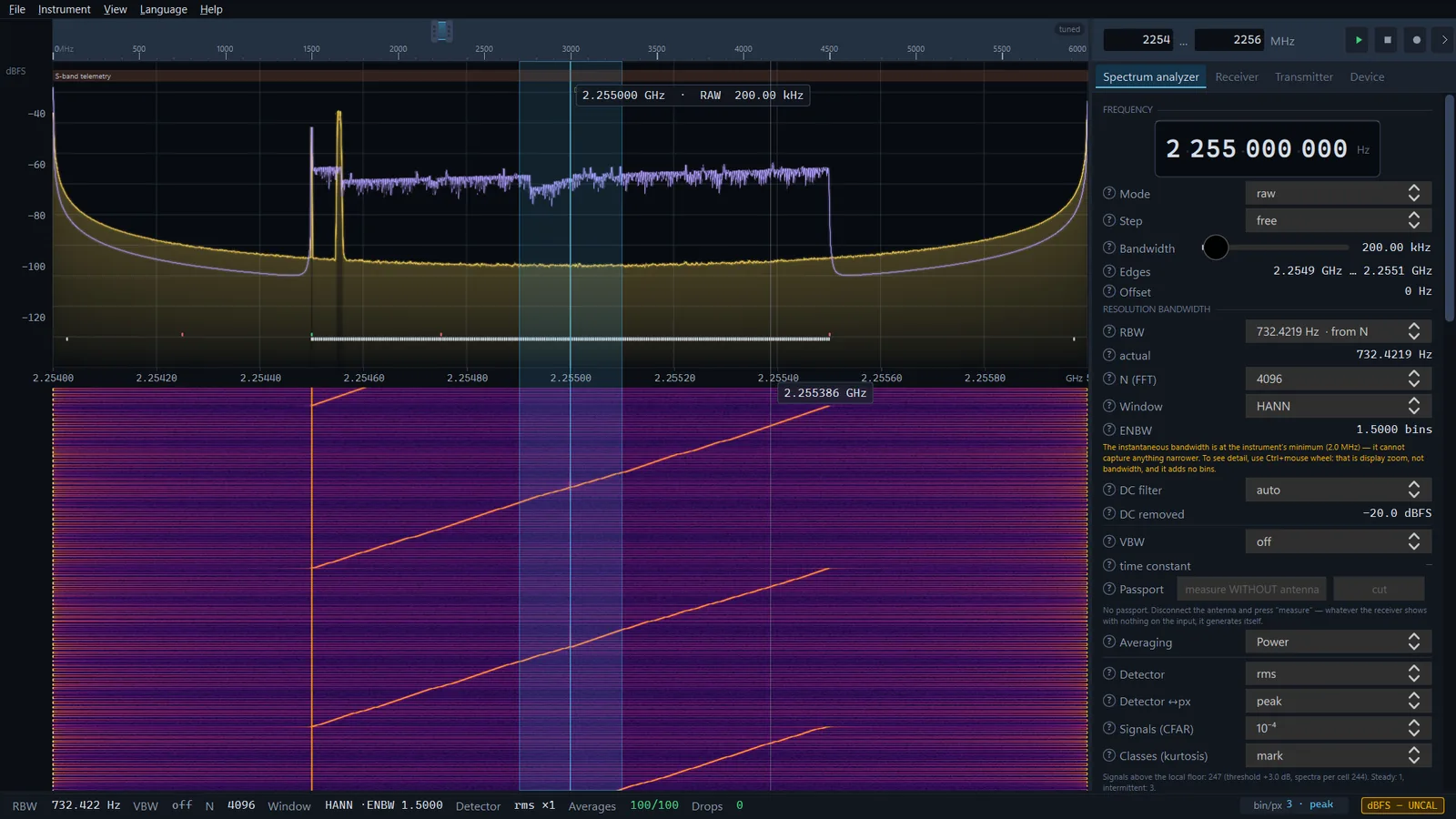
Besides traces, the app places short marks on the spectrum. Some show where the level really is above the local noise floor (CFAR) and what a bin contains — a steady signal or an intermittent one (kurtosis classes). Others tell you which peaks are not to be trusted because the receiver itself produces them: spurs that move with the local oscillator, and the passport of the receiver's own spurs. Marks hide nothing and correct nothing — they explain the picture.
Which marks appear on the spectrum
A mark is a short vertical tick. Marks about the receiver sit at the top of the spectrum; detection marks sit at the bottom, above the frequency labels. They are marks, not traces: neither an excess over the local floor nor the class of a bin is a level in dBFS, and they have no place on the spectrum scale.
| Row | Appearance | Meaning | Where it is switched on |
|---|---|---|---|
| Passport | amber ticks at the very top | the device's own spur from the passport — the instrument, not the air | appear as soon as a passport has been taken |
| LO spurs | blue ticks slightly lower | the bin moves with the local oscillator — a product of the receiver | Spurs in a sweep |
| Classes | green and red ticks at the bottom | green — steady level, red — intermittent | Classes (kurtosis) |
| CFAR | light ticks at the very bottom | the level is above the local noise floor | Signals (CFAR) |
All the selectors are in the Resolution bandwidth group on the Spectrum analyzer tab. Marks that fall into one pixel are merged into one. Separately, a vertical amber line labelled DC (or DC− while the DC filter is active) marks the centre of the captured band in tuned mode: a peak sits there that is not on the air.
Signals (CFAR)
The Signals (CFAR) selector has three positions: off (default), 10⁻⁴ and 10⁻⁶. The number is the false-alarm probability per bin: how rarely noise alone should cross the threshold. The lower the probability, the higher the threshold and the fewer the false marks.
The threshold is computed from the local noise floor, not from one floor for the whole screen. The floor is the median of a block of bins, so narrow signals do not raise it. A fixed threshold of "floor plus X dB" lies twice: next to strong signals and on the slopes of the receiver's response it scatters false marks, and where the floor is lower it misses weak signals.
- In tuned mode
- The level accumulates for half a second, after which the marks are recomputed. A mark needs at least 3 dB over the floor: with thousands of spectra the statistical threshold is fractions of a decibel, and the receiver's floor is not flat to that precision. The band centre (DC) and the passport bins are not marked. 0.9.38 After a pause, a transmission or a reconnect the window starts afresh: the first window is not computed from spectra taken before the break.
- In a sweep
- By default there is one spectrum per cell, so the threshold is high: 9.6 dB for 10⁻⁴ and 11.4 dB for 10⁻⁶; the actual threshold is shown in the line below the selectors. Weak signals are not marked there by construction. The marks are computed from a completed pass; passport bins and bins marked by the LO shift are left out — what remains is what the instrument cannot explain.
Below the selectors there is a line Signals above the local floor: … (threshold +… dB, spectra per cell …): how many separate stretches are marked, what threshold resulted and from how many spectra. The same line warns when the thresholds are not exact: with a detector other than rms and several spectra per sweep segment, and when the floor block is too small because of a small N.
The actual rate of false marks is higher than the one set, and this has been measured: twice that in tuned mode, 2–4 times in a sweep at N of 4096 and up, and up to 9 times at N 1024. A signal wider than the floor window (320 bins in tuned mode, half a segment step in a sweep) raises the floor by itself and is marked only at its edges.
Classes (kurtosis)
The Classes (kurtosis) selector: off (default) or mark. Spectral kurtosis compares the scatter of power in a bin with the scatter pure noise gives, and it does not need to know the noise level itself. There are three outcomes:
- a green mark — the scatter is significantly below that of noise: a steady level (a carrier, an instrument spur);
- a red mark — the scatter is significantly above: an intermittent signal (bursts);
- no mark — noise, or something that cannot be told from noise.
The method needs hundreds of spectra per bin, so it works in tuned mode. A class is shown once it holds for two half-second windows in a row; until then the line below the selectors reads Classes: collecting spectra (two half-second windows are needed), and afterwards Steady: …, intermittent: …. In a sweep there is one spectrum per segment and there are no classes — the panel says so.
What to keep in mind when reading the classes:
- A class is the scatter of power in the bin, not a property of the signal. A carrier that drifts across several bins passes through each one briefly and reads as "intermittent".
- A wideband digital signal is itself nearly Gaussian and stays "noise". This is a property of the method, not an error.
Spurs that move with the local oscillator
In a sweep that a HackRF One makes by itself, the Spurs selector occasionally runs one pass with a shifted local oscillator and marks in blue the narrow lines that moved with it: a signal on the air stays at its frequency, a product of the receiver does not. The remove mode substitutes the shifted pass into those bins. How it works and what it costs is on the Sweep page. The passport leaves such lines out on purpose: it is a different mechanism and a different reason not to trust a bin. A software sweep has no shifted pass, and the line under the selector 0.9.36 says so.
The passport of the receiver's own spurs
Harmonics of the receiver's reference oscillator sit at fixed frequencies and are not caught by an LO shift: they behave like real signals. The only honest way to find them is to measure an input with nothing connected to it. Whatever the receiver shows with nothing on the input, it generates itself. The list of those frequencies is the passport.
Taking the passport
- Disconnect the antenna; best of all, put a 50 Ω termination on the input. The app cannot verify that the antenna is really off — that is your responsibility, and the button label says so plainly.
- Start a sweep over the range you need the passport for. In tuned mode the button is disabled.
- In the Passport row of the Resolution bandwidth group press measure WITHOUT antenna. The button shows measuring… and a counter of the passes left: there are twenty in total.
Twenty passes are four groups of five. Within a group the mean without the loudest pass is taken, and between groups the minimum, so a chance burst of interference does not enter the passport. On a HackRF One every other group runs on a shifted local oscillator: whatever moves with it is a product of this segment grid rather than the device's own spur at that frequency, and it does not go into the passport. On the author's device taking twenty passes over 100–6000 MHz took 11.6 s.
0.9.36 The sweep rate on a HackRF One follows the set RBW (the widest rate when none is set), so the passport is also taken at the rate for that RBW. Take it with the RBW you measure with and with the same gains — the line under the buttons gives the same advice when the passport was taken in another state.
The passport is stored in a file in the calibration folder of the app's data folder and is remembered between launches. It carries the device's serial number, the state it was taken in and the range it covers. Each device type has its own file 0.9.25: a passport taken on an RTL-SDR does not erase the HackRF One passport.
What gets marked
The frequencies in the passport are absolute, so the amber marks stand on the spectrum in any mode — in a sweep and in tuned mode, where you move in to look at a suspicious peak. The marks do not hide the bin: it is shown as measured, and the mark says "this is the instrument, not the air".
0.9.39 Bins are labelled with their true frequency. A passport taken by earlier versions lies half of its bin above the spur: the cut hole still covers it (the mask tolerance is at least two bins), and the mark stands half a bin to the right until the passport is taken again.
Cut and show
The cut button excludes the passport bins from the measurement; the same button, now labelled show, brings them back. The choice is remembered between launches. This is not a substitution of values: the bin is simply not measured.
- In tuned mode and on a narrow sweep the cut bins fall to the bottom of the picture as a notch.
- On a wide sweep a pixel takes the neighbouring measured bins, and no holes are visible.
- On the heat map the columns are empty.
- A hole is no narrower than ±5 ppm of the frequency: the reference oscillator's harmonics drift with temperature in proportion to frequency.
The button is active when a passport exists, the source is a device, and the passport was taken on that very device. While a recording is played back the passport is not cut: it is unknown what recorded it and in what state; the marks stay.
What the line below the buttons says
Below the Passport row the app always states what the passport's situation is:
- how many frequencies the passport holds, when it was taken and how many bins of the current grid it covers;
- Covers … MHz or No passport here: … MHz — which range is covered. Measuring again on a narrower range replaces the passport only there; the rest stays;
- Complete here above … dB over the noise floor — the completeness threshold: weaker spurs are not in the passport;
- the passport was taken in a different state — with a list of what differs: sample rate, N, gains. The marks and the cut act by frequency, but the completeness matches that state. Measuring in the new state replaces the old passport entirely, and the app says so in the dialog Old passport replaced;
- the passport was taken on a different instrument — then it does not apply at all, and there are no marks;
- the passport was taken without the LO cross-check — part of it is valid only for the range it was measured on. This happens with old files and with an RTL-SDR, where the sweep is done in software.
When the measurement is cancelled
Passes from two different device states must not be combined into one passport. So the measurement is cancelled, what was gathered is discarded and the old passport stays as it was if, in the middle of the measurement:
- you stop the sweep;
- 0.9.25 a receive setting is changed: on a HackRF One — LNA, VGA or the input amplifier; on an RTL-SDR — the tuner gain, AGC, direct sampling or ppm;
- 0.9.25 the device does not confirm a gain.
Changing the range, RBW, N or the sample rate does not cancel the measurement but starts it over on the new grid. If a gain is unconfirmed even before the start, the app 0.9.25 refuses with the dialog Passport not taken: the measurement would match no known state of the device.
Finding signals in SDR SA PRO PRO
CFAR marks only flag bins above the local floor. In SDR SA PRO the Scanner tab goes further: it looks for signals in a sweep and in tuned mode and keeps a list of them — centre, width, level in dB above the local noise floor (not dBm), how many times the signal was seen out of how many looks. Below the list it says how far the list can be trusted: thresholds, sensitivity, the rule for a row to appear.
How to look for a signal is chosen in the Search method list 0.9.47: Statistical (from the noise distribution) (the default), Margin above the floor, dB, CA-, GO-, SO- and OS-CFAR, Median + spread (MAD), dB and Two thresholds (hysteresis). What is found can be labelled and guarded with the frequency table. Details are on the Scanner page.
Limits
- CFAR marks and classes are auxiliary marks, not a level measurement. The actual rate of false CFAR marks is higher than the one set (see above).
- In a sweep CFAR marks only strong signals (by default a threshold of 9.6 or 11.4 dB), and there are no classes at all.
- The passport is complete only for the noise floor it was taken at: whatever was below its threshold is not in it.
- The passport can be taken only in a sweep and only for IQ receivers. The app cannot check that the antenna is disconnected.
- On an RTL-SDR the passport is taken without the LO cross-check, and the Spurs check produces no result there.
- While an IQ recording is played back the passport is not cut — only the marks remain.
- With a tinySA 0.9.25 there are no such marks and no passport: the instrument returns ready-made levels and has its own spur suppression — see tinySA and tinySA Ultra.