Windows 10 / 11 · x64 · English and Ukrainian

A spectrum you can trust

SDR Signal Analyzer is a spectrum analyzer and receiver for Windows. Real-time spectrum and waterfall, a 1 MHz to 6 GHz sweep in a single pass, and IQ recording with no silent losses: every lost sample is counted. Works with HackRF One, RTL-SDR and tinySA, and the paid SDR SA PRO also with ADALM-Pluto, Fobos SDR and bladeRF 2.0 micro.

Minimum: Windows 10 version 1809 (10.0.17763) or newer, x64. A GPU driver with OpenGL 3.3 is required — without it the spectrum and waterfall are not drawn at all.

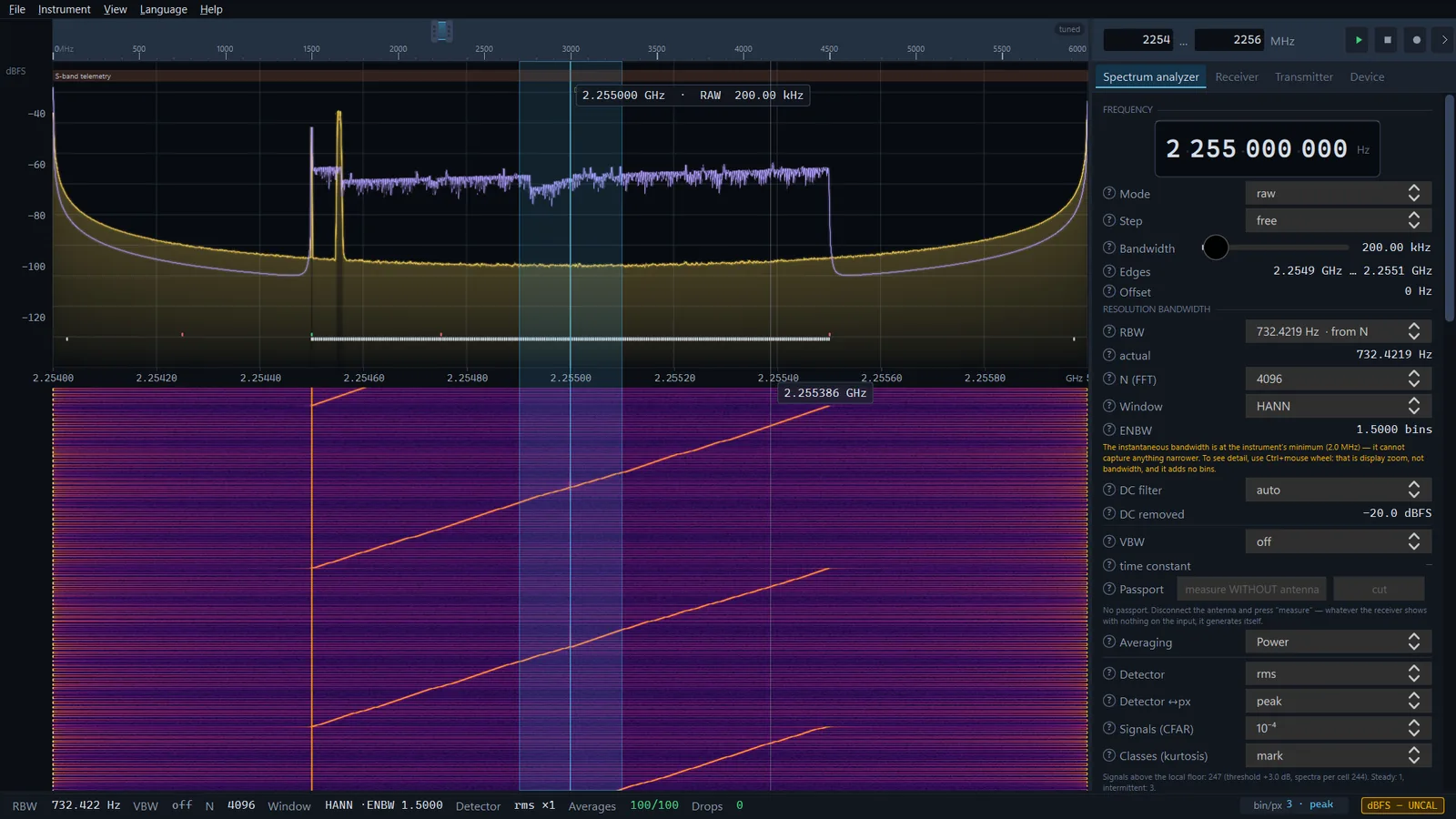
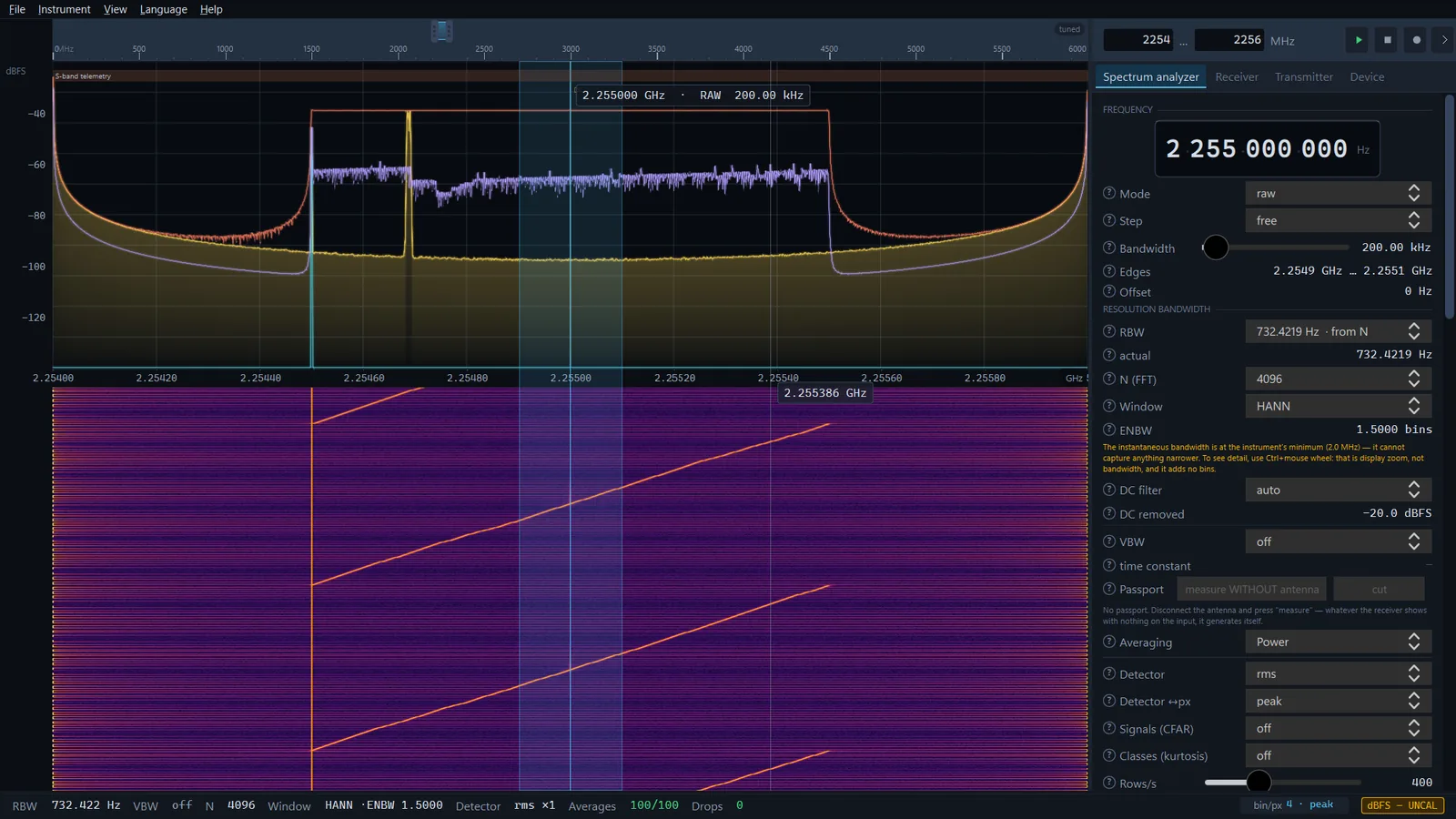
SDR Signal Analyzer window on the demo signal: spectrum with traces, waterfall, the control panel with RBW, window and detector, and the trust bar along the bottom
The trust bar along the bottom never hides: RBW, VBW, detector and the drop counter are always in view, and the window, N and averaging count whenever they apply.
1–6000 MHz
Full sweep in a single 0.6–0.7 s pass
24.26 GB
Ten minutes at 20 MS/s, zero drops
61.3 fps
On the heaviest tab of the interface
11 detectors
From peak and RMS to CISPR quasi-peak

What it is for

See what is on the air right now

The radio spectrum is a picture of everything transmitting around you. SDR SA shows it in real time and lets you measure what you see.

  • Finding drones, UAVs and FPV video links
  • Checking jammers and electronic warfare gear
  • Hunting down sources of interference
  • Testing radio equipment and antennas
  • Comparing signal levels before and after a change
  • Viewing analogue video from FPV systems
  • Recording IQ for later analysis
  • Preliminary EMC assessment
  • Learning what the air really looks like

Features

Analyzer, receiver and transmitter in one window

Spectrum analyzer, receiver, transmitter and device control are four tabs of a single panel. Switching between them neither interrupts the stream nor resets your settings. Every feature is described in detail in the Wiki.

Spectrum and waterfall

The waterfall is drawn by the GPU: a ring texture with the palette in the shader gives 239 fps where a common plotting library gives 32. The app warns about palettes that are not monotonic in lightness: they draw edges where the signal has none.
1–6000 MHz sweep

The whole range of a HackRF One in one 0.6–0.7-second pass at the default RBW: hundreds of segments are stitched without resampling, because the tuning frequencies land on a shared bin grid. The seams are quieter than the rest of the spectrum — measured, not claimed.

Receiver with demodulation

NFM, WFM (mono), AM, DSB, USB, LSB, CW and the raw stream, with squelch. In NFM and WFM the audio panel shows the CTCSS sub-tone between 67 and 254 Hz when there is one. Digital modes (DMR, P25, TETRA) are not decoded — and the app says so plainly.

FPV video

The fpv-video mode decodes analogue FM video, NTSC or PAL, from the sync pulses: it works out the standard and the polarity by itself. PAL colour appears only when four separate checks on the burst agree; otherwise the picture stays monochrome and the status line says why. Black-and-white video needs 8 MS/s or more, PAL colour 12.5 MS/s or more.

IQ recording with no silent losses

Ten minutes at 20 MS/s — 24.26 GB and not a single lost sample. The SigMF sidecar is updated during the recording and replaced atomically: even a file cut short by a crash still reads, and says of itself complete: false. And if a sample is lost after all — on USB or on a slow disk — it is counted and marked in the metadata.

Transmitter and generator

Carrier, two tones, a swept tone, noise, a video test card, or playback of your own recording — for checking a signal chain or an antenna, with HackRF One only. Radiating into an antenna is your responsibility and requires the authorisation that applies to you.

Coverage

From one megahertz to six gigahertz

With a HackRF One the instrument covers the band where nearly all consumer and field radio lives; an RTL-SDR takes 28.8–1766 MHz of it. An overview ruler spanning the receiver's full range sits above the spectrum, with two handles to drag the span.

1 MHz1 GHz2 GHz3 GHz4 GHz5 GHz6 GHz
  • FM radio 88–108 MHz
  • GSM / LTE-900 880–960 MHz
  • LTE-1800 1710–1880 MHz
  • Wi-Fi 2.4 and ELRS 2.4 GHz
  • Radar 2.7–3.1 GHz
  • Wi-Fi 5 GHz and FPV 5.8 5.15–5.9 GHz

Interface

One panel, four tabs

Spectrum and waterfall fill the window on the left, every control sits on the right. The interface is available in English and Ukrainian, and the language switches without a restart. SDR SA PRO has a fifth tab, the Scanner.

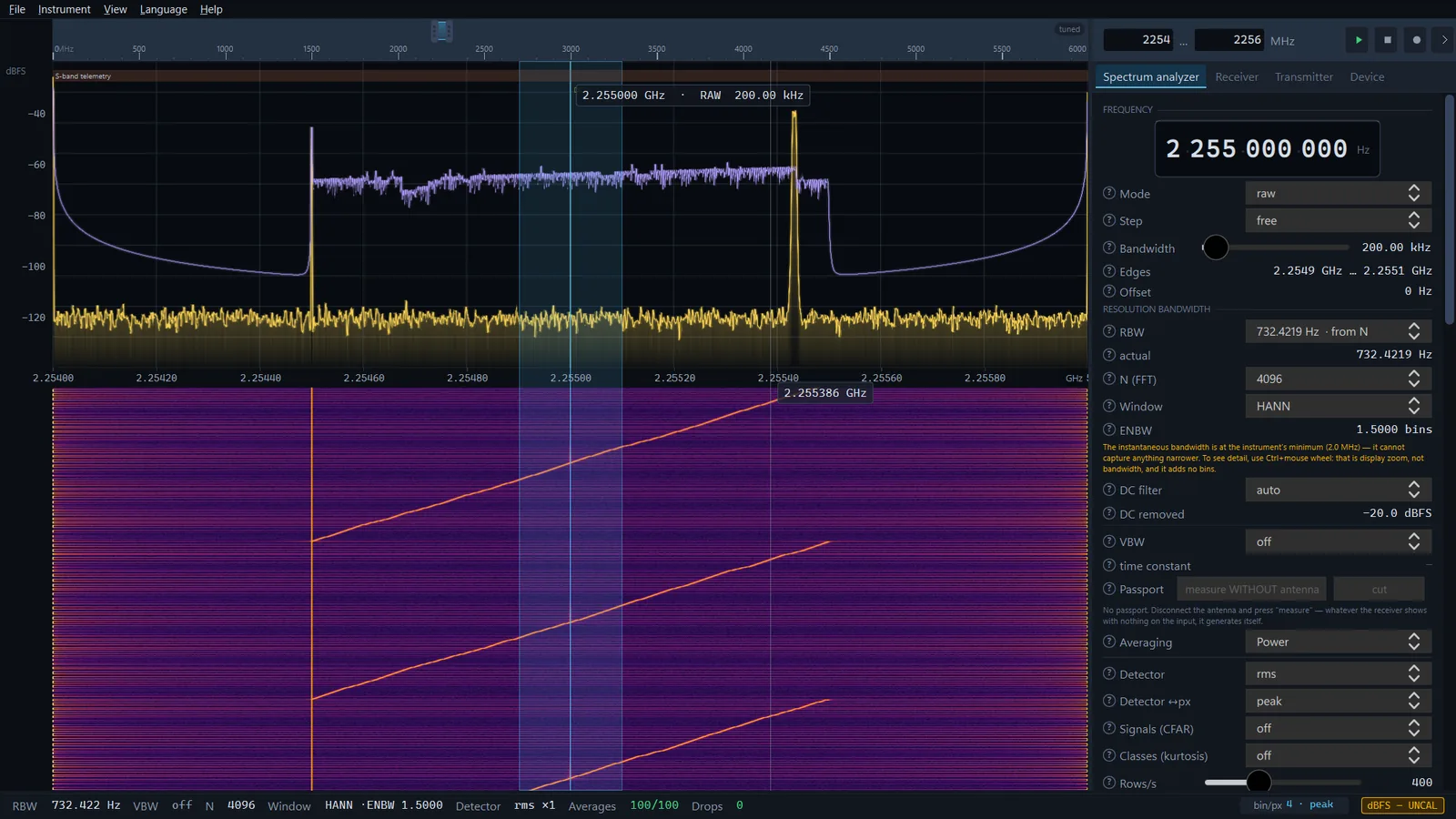
Four traces in different colours on one spectrum
Four traces, each with its own detector. The difference between them is not cosmetic.
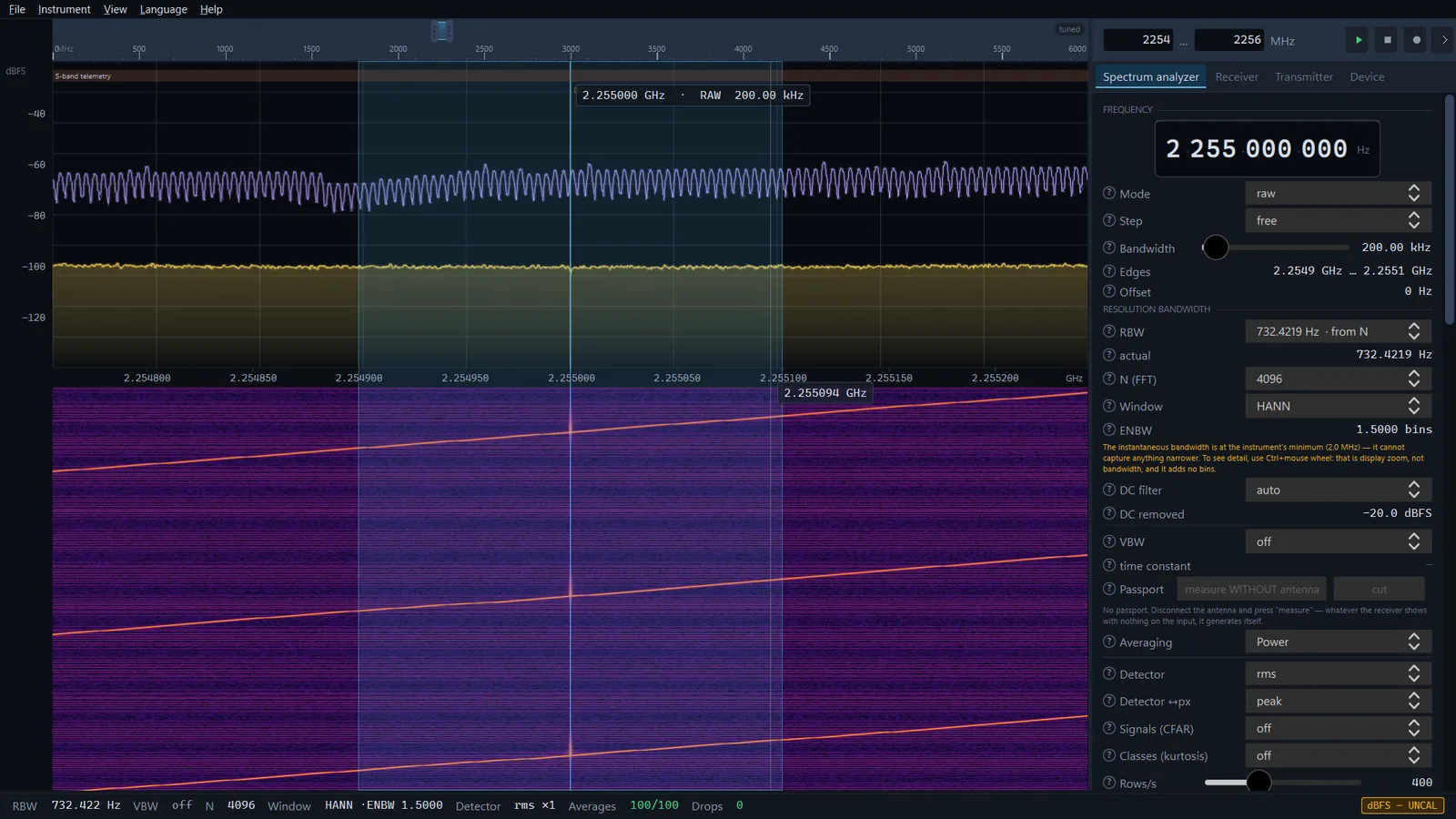
A magnified narrow part of the spectrum and waterfall with the sweep line of the demo signal
Display zoom without stopping the stream: Ctrl+wheel stretches a part of the spectrum and waterfall.
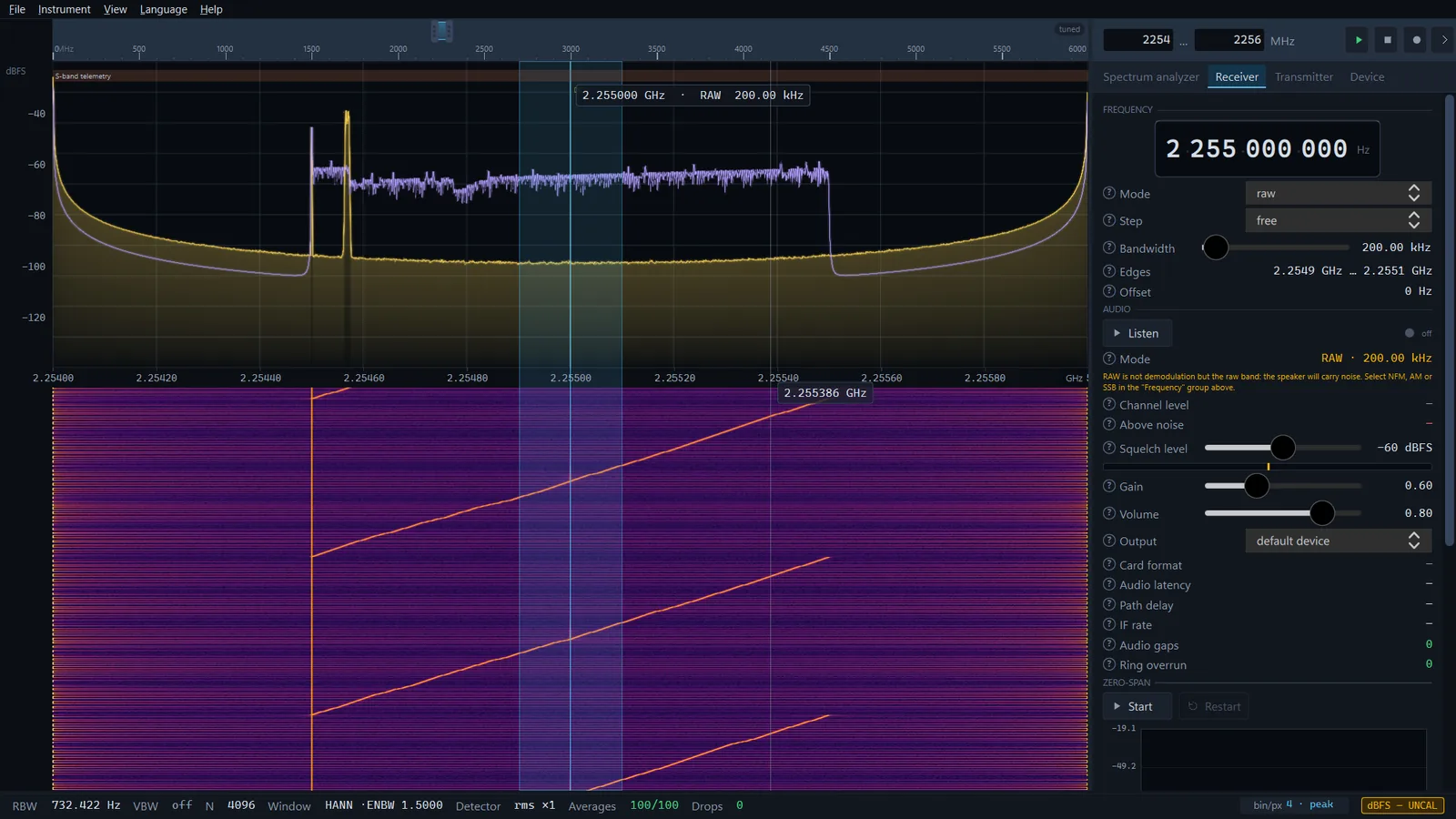
The Receiver tab: mode, bandwidth, squelch level, gain, volume and zero-span
The Receiver tab: channel mode and bandwidth, audio with a squelch level and, below, zero-span.
A row of detection marks below the spectrum: white signal marks and coloured class marks
Detection marks below the spectrum: what exceeds the local noise floor (CFAR) and the bin classes.

For engineers

A measuring instrument, not a pretty FFT

A receiver with a spectrum display and a spectrum analyzer are different things. Here is exactly where the line runs, and why every number below can be checked.

RBW

Resolution bandwidth in hertz, not "FFT size"

RBW is the primary parameter. Changing the window keeps the bandwidth and changes N, not the other way round: the same N = 4096 gives 5.127 kHz with Hann and 12.887 kHz with flat-top. The achieved bandwidth is shown next to the one you asked for, and when it cannot be reached the app says so instead of quietly handing you a wider one.

Detectors

Eleven of them, and every trace has its own

Peak, neg-peak, sample, RMS, average(log), the percentile detectors median and p90, the EMC weighted ones — quasi-peak, cav, crms — and a local noise-floor trace. Averaging in decibels lowers the noise floor not by a constant 2.51 dB as the handbooks say, but by an amount that depends on the fold factor: at ×1 it does not lower it at all, at ×8 it lowers it by 2.09 dB. The instrument computes this for the current mode and shows the number.

Losses

Four counters, not one

The source ring, the USB transport, a user pause and the writer's ring are four different failures with four different causes. At 20 MS/s the ring never overflows, while the transport loses 1.1–1.4 %.

That second number is missing from every program we have looked at: libhackrf does not report failed transfers at all, so it is counted against the clock.

Load

When the machine cannot keep up, it tells you by how much

The spectrum is the most expensive part of the processing. When it no longer fits into the airtime, it is computed from a fraction of the blocks while recording, audio and the envelope still get every block. The share of time the spectrum was actually computed from stands in the trust bar as "coverage NN %" — which is also your probability of catching a short burst.

Display

The on-screen detector is real too

When 4096 bins have to fit into 1300 pixels, each pixel reduces all of its bins with the detector you chose. Texture interpolation would skip two bins out of three, and a narrow spur would vanish from the waterfall without a trace.

Detection

CFAR and bin classes

Separate from the traces, marks below the spectrum show what exceeds the local noise floor at a chosen probability of false alarm — with bins already explained by the spur catalogue or by the local-oscillator offset left out. Alongside them, bins are classified by spectral kurtosis: steady, intermittent, or noise.

About honest numbers. Levels from HackRF One and RTL-SDR are shown in dBFS, and the trust bar says so with the "dBFS — UNCAL" badge: there is no amplitude calibration for these receivers yet. Only a tinySA gives calibrated dBm, because the instrument does the measuring. The quasi-peak detector matches the CISPR 16-1-1 pulse response table within the tolerances of the standard, but it is a preliminary estimate, not a certification measurement: the resolution bandwidth here is not the one the standard prescribes, and the app says so.

Hardware

What it works with

The app talks to the devices directly, with no intermediate layers: to a HackRF One through libhackrf, to an RTL-SDR with its own driver, to a tinySA over its USB port. That is why the HackRF itself retunes during a sweep, rather than the software, and the whole range takes less than a second. The paid SDR SA PRO adds three more receivers.

Supported HackRF One

1 MHz to 6 GHz, 2–20 MS/s: spectrum and waterfall, a hardware sweep over the whole range, listening, IQ recording and the test-signal transmitter. Needs the WinUSB driver, assigned once with Zadig.

Supported RTL-SDR

RTL2832U dongles with the R820T / R820T2 tuner: 28.8–1766 MHz, 1.024–2.56 MS/s — spectrum, sweep, listening and recording. The app's own driver over WinUSB, no librtlsdr and no rtl_tcp. Tested on R820T2; no transmitter.

Supported tinySA Ultra / tinySA

A calibrated power analyzer: the instrument sweeps by itself and sends dBm over its USB port, and the app shows them in the spectrum, waterfall and traces. No audio, no IQ recording, no zero span. Tested on a tinySA Ultra.

Supported IQ recordings from file

Your own or someone else's: the same spectrum, waterfall and detectors work on a file exactly as they do on live air.

Supported Demo signal

A full synthetic stream with no hardware at all — so you can try the app before buying a receiver.

SDR SA PRO ADALM-Pluto / Pluto+

Over the device's own network link — USB or, on Pluto+, Ethernet, no libiio: 70–6000 MHz and 2.5–30.72 MS/s on the tested unit, one receive channel. Loss-free over USB up to about 5 MS/s on an idle machine (Ethernet not measured). The band edges are 13–25 dB noisier than the middle: the app does not load the chip's FIR filter yet.

SDR SA PRO Fobos SDR

RigExpert, through the maker's libraries: 50–6900 MHz, 8–80 MS/s (up to 50 with the scanning firmware). With that firmware the instrument sweeps by itself — 50–6900 MHz in under a second on the tested unit.

SDR SA PRO bladeRF 2.0 micro

Nuand, over USB 3: 70–6000 MHz, 0.52–61.44 MS/s. Losses counted from the device's own timestamps; a USB stall during a sweep is recovered automatically and counted.

Receivers marked SDR SA PRO work in the paid edition only. Other receivers are not supported yet. If you need a particular one, tell us — it affects what we build next. How to connect each device and what it can do in the app is in the Wiki.

Getting started

Four steps to your first spectrum

  1. Install the app

    From Microsoft Store: one click to install, one to remove, updates arrive on their own. You need Windows 10 (version 1809 or later) or 11, x64, and a GPU driver with OpenGL 3.3.

  2. Connect the receiver

    A HackRF One or an RTL-SDR goes on a short, shielded USB cable, preferably straight into a port on the computer; both get the WinUSB driver assigned once with Zadig. A tinySA connects as a USB serial (COM) port, with no such step. No device yet? Pick the demo signal and carry on.

  3. Choose a frequency and a bandwidth

    Set the span with the two fields in the side-panel header or the overview ruler handles, and the RBW on the spectrum analyzer tab. Or let the ruler handles go to the ends and look at the whole range at once.

  4. Tune the view to what you are looking for

    Hunting a weak narrow signal — use the peak detector. Measuring a noise floor — rms. Chasing a rare burst — add a trace with peak accumulation and watch "coverage" in the trust bar.

Editions

The free app and PRO

Everything described above, except what is marked SDR SA PRO, is in the free edition on Microsoft Store, which is for learning and hobby use. PRO is for those who need commercial or official use and capabilities beyond the hobby scenario.

SDR SA

Free

The complete instrument for learning and hobby use.

  • Devices: HackRF One, RTL-SDR, tinySA / tinySA Ultra
  • Real-time GPU spectrum and waterfall
  • 1–6000 MHz sweep with stitched segments
  • Four traces, eleven detectors, CFAR marks
  • Receiver: NFM, WFM, AM, DSB, USB, LSB, CW, CTCSS
  • Video from FPV systems, PAL with colour
  • IQ recording with SigMF metadata
  • Transmitter and generator for chain testing

Condition: free for personal, non-commercial use — learning and hobby.

Download for free

No sign-up, no account, no network access.

SDR SA PRO

Price and terms on request

A separate app installed next to the free one: everything the free edition does, and more. For commercial and official use — organisations, units and laboratories.

  • Devices: HackRF One, RTL-SDR, tinySA / tinySA Ultra, bladeRF 2.0 micro, ADALM-Pluto / Pluto+, Fobos SDR
  • Trace markers; band power, OBW and ACPR in a fixed tuning
  • Calibration in dBm
  • Scanner mode with eight signal detection methods
  • Frequency-table classifier: band name and type, channels, alarms; IQ recording on alarm in a fixed tuning
  • Neural-network signal classifier
  • Coherent channels and cross-channel detection
  • Support for additional receivers on request
  • Development against the customer's requirements
Send an enquiry

Items marked with a clock are in progress, not in the current build.

Done, and what comes next

We do not list features that do not exist yet. Here is the honest state of the work.

  • Done Live waterfall, metrology, HackRF, recording with no silent losses, stitched sweep
  • Done Receiver and audio, zero-span, transmitter, FPV video, new detectors
  • Done RTL-SDR with the app's own driver, tinySA as a calibrated power analyzer, auto scale
  • DonePRO ADALM-Pluto / Pluto+, Fobos SDR and bladeRF 2.0 micro receivers
  • DonePRO Scanner with a frequency table and alarms; trace markers, band power, OBW and ACPR
  • NextPRO Amplitude calibration, after which dBFS becomes dBm
  • NextPRO Neural-network signal classifier; coherent channels
  • Next Constellation and EVM, scheduled trigger

Frequently asked

Short answers

How is this different from SDR# or SDR++?

SDR# is a good receiver with a spectrum display, but it is not a measuring instrument: the FFT size there is set in samples rather than a bandwidth in hertz; there are no peak / sample / RMS / average detectors; and there is no stitched sweep beyond the receiver's instantaneous bandwidth.

SDR SA was built the other way round: RBW in hertz as the primary parameter, real detectors on every trace, a sweep across the receiver's whole range, and honest counters for whatever was lost.

Is the app free?

Yes, the Microsoft Store edition is free for learning and hobby use. Commercial and official measurement work needs PRO, which is paid; we send its terms on request.

What is SDR SA PRO?

A separate paid app that installs next to the free one and does everything it does, plus ADALM-Pluto / Pluto+, Fobos SDR and bladeRF 2.0 micro receivers, a Scanner with a frequency table and alarms, and trace markers with band power, OBW and ACPR. Price and terms are on request: write to us. Details are in the Wiki.

What are the system requirements?
  • Windows 10 version 1809 (10.0.17763) or newer, or Windows 11; x64.
  • A GPU driver with OpenGL 3.3 is mandatory. Without it the panels open but the spectrum and waterfall are not drawn at all, and the app shows an "OpenGL unavailable" window.
  • CPU: with a HackRF One at N 4096 the whole app takes about 28 % of one core at 2 MS/s, about 76 % at 20 MS/s and 62 % during a full sweep (measured on an i7-13650HX with a 144 Hz display).
  • For a weaker machine there is a "spectrum frames" setting of 60 / 30 / 15: no waterfall lines are lost, only the redraw rate goes down.
Does the app collect any data about me?

No. It makes no internet connections at all: no telemetry, no crash reports, no usage statistics, no accounts and no advertising. Everything it writes stays on your disk. Details are in the privacy policy.

The app does not see my receiver, or the spectrum is empty
  • Check that the WinUSB driver is assigned to the HackRF One or RTL-SDR in Windows (with Zadig). A tinySA does not need it: it connects as a USB serial (COM) port.
  • If the HackRF firmware is old, update it: the app was tested with firmware 2024.02.1 (API 1.08).
  • Use a short shielded USB cable and connect the receiver without hubs.
  • Make sure no other program is holding the device; reboot if needed.
  • If the panels are there but the spectrum is empty, it is almost certainly OpenGL 3.3 — update your GPU driver.

More causes and remedies are on the Wiki page Troubleshooting.

Where do recordings go, and how large are they?

IQ recordings go to C:\sdrsa-rec, and only when you start a recording yourself. As a rule of thumb, 20 MS/s in cs8 is about 40 MB per second — 24 GB in ten minutes.

The disk has to sustain that rate continuously. An SSD that looks fast can hold 1443 MB/s until its cache runs out and then drop to 8.6 MB/s with 23-second stalls; on such a disk a ten-minute recording lost 1.17 billion samples. A ring buffer of any size saves you from a momentary spike, not from a permanent shortfall in speed.

Can it decode digital voice modes?

Analogue modes, yes: NFM, WFM, AM, DSB, USB, LSB, CW, plus the CTCSS sub-tone. DMR, dPMR, NXDN, D-STAR, P25 and TETRA are not decoded — their voice runs through AMBE/ACELP vocoders, which is a separate story. DCS is not decoded either.

What about Linux, macOS or Android?

No. Windows 10 and 11 only, x64.

Is the app safe?

The Microsoft Store package goes through Microsoft's certification, installs and uninstalls through the operating system's own mechanisms, and does not need administrator rights to run. The free app does not go online; SDR SA PRO with an ADALM-Pluto connects only to the device itself on the local network, never to the internet.

Where do I get the sources of the LGPL libraries?

Qt, PySide6 and related libraries ship under LGPL-3.0, which requires that you be able to replace them and to obtain their sources. In an installed MSIX package the Qt libraries cannot be replaced, so the same version of the app is also built as a portable ZIP package in which the Qt6*.dll files are separate and replaceable. We send that package and the sources of the libraries on request to support@sdrsa.net, free of charge; state the app version in your request. Details are in the terms of use.

Contact

Get in touch

A PRO enquiry, a receiver you need supported, a bug you found, or just a question — all of it goes here.

Your message comes to us, and we reply to the address you give. How we handle this data is explained in the privacy policy.